Guide
FX spot dates: how T+2 really works around holidays
Most currency trades settle two business days later. But a US holiday the next day does not move spot, while a holiday in the other currency does. Here are the rules, with real 2026 dates.

Julien Desaunay
Last reviewed 9 November 2026 · 3 min read
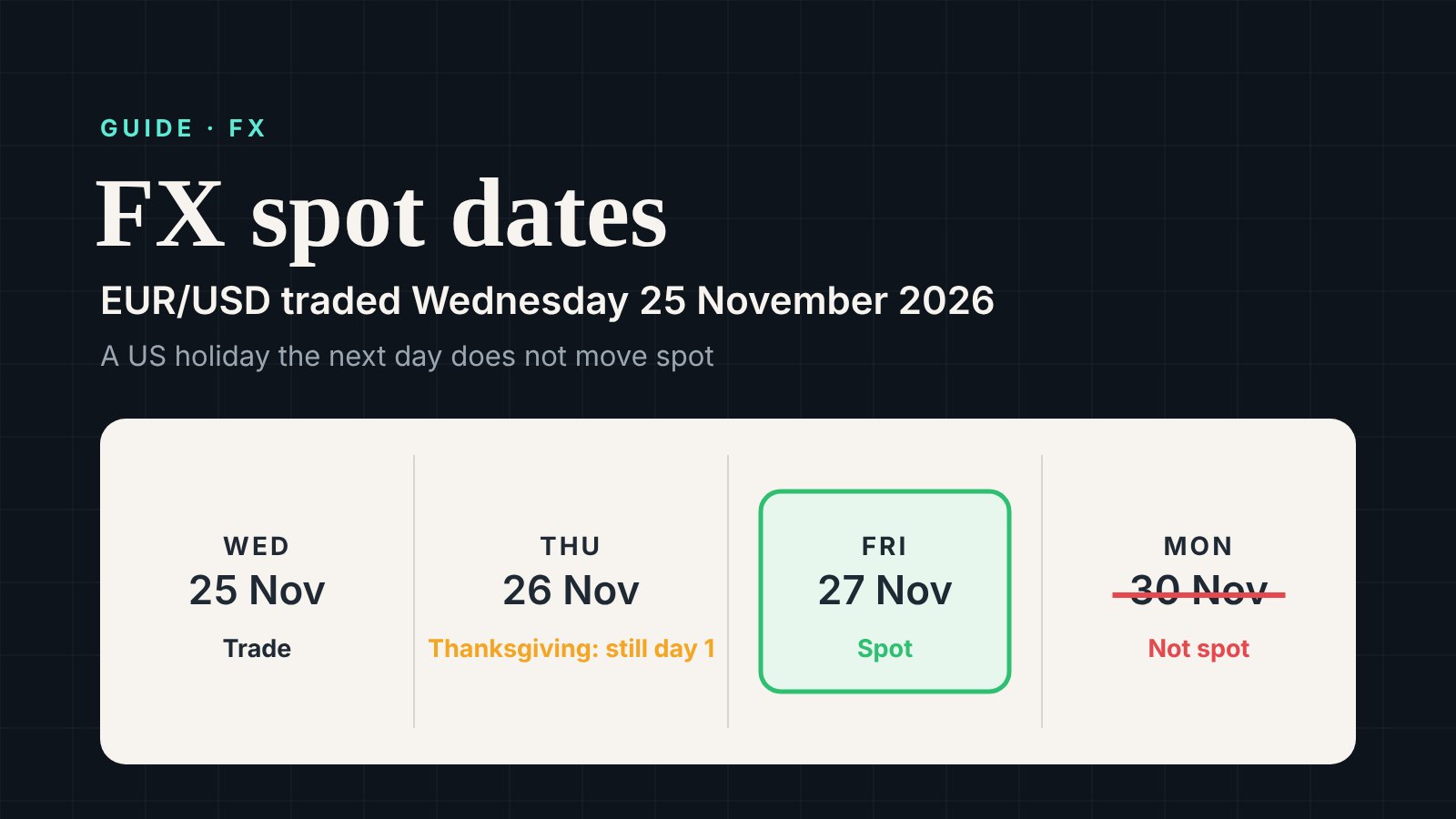
Most currency trades settle two business days after the trade. Traders call it T+2, and the settlement day is the spot date.
But "two business days" hides a few rules. Get one wrong and the money moves a day late. This guide shows each rule with real dates.
The basic rule#
Spot is two business days after the trade date. A few pairs against the US dollar settle in one day instead.
| Pair | Spot |
|---|---|
| EUR/USD, GBP/USD, USD/JPY and most others | T+2 |
| USD/CAD, USD/TRY, USD/PHP, USD/RUB | T+1 |
So far, so simple. The hard part is which holidays count.
Rule 1: the dollar only counts on the spot date#
Take a pair against the dollar, such as EUR/USD. The day after the trade only needs to be open for the other currency. A US holiday on that day does not count.
The spot date itself is different. It can never be a US holiday.
Two examples from 2026:
| Trade date | Pair | US holiday | Spot date | Wrong answer |
|---|---|---|---|---|
| Wednesday 25 November | EUR/USD | Thanksgiving, Thursday 26 | Friday 27 November | Monday 30 November |
| Friday 4 September | EUR/USD | Labor Day, Monday 7 | Tuesday 8 September | Wednesday 9 September |
Rule 2: the other currency counts on both days#
The rule is not symmetric. A holiday in the other currency does move the spot date.
GBP/USD traded on Friday 28 August 2026 is a good example. Monday 31 August is a UK bank holiday. So the first good day is Tuesday 1 September, and spot is Wednesday 2 September.
Weekdays only. ✕ closed, ½ half day or early close, blank: open.
Rule 3: one-day pairs#
USD/CAD settles T+1. The spot date must be open in both currencies, and it cannot be a US holiday.
Traded on Friday 4 September 2026, USD/CAD cannot settle on Monday 7 September. That day is Labor Day in the US and Labour Day in Canada. Spot moves to Tuesday 8 September.
Weekends are not always Saturday and Sunday#
Do not assume a Saturday and Sunday weekend. In our data, the Saudi riyal has a Friday and Saturday weekend. The UAE moved its weekend from Friday and Saturday to Saturday and Sunday in 2022.
A good calendar keeps each currency's weekend, with the date it changed.
Forwards and the end of the month#
A forward settles later than spot, for example one month later. The forward date starts from the spot date, not the trade date.
One rule catches many systems. Say spot is the last business day of a month. Then the forward settles on the last business day of the target month. Traders call it "end-end".
- EUR/USD traded on Wednesday 28 October 2026 spots on Friday 30 October. That is the last business day of October.
- So the one-month forward settles on Monday 30 November 2026, the last business day of November.
Sometimes a forward date would roll into the next month. It then moves back to the last business day of its own month. This is the "modified following" rule.
Crosses without the dollar#
A cross is a pair with no dollar, such as EUR/GBP. Many banks work out the spot date of each currency against the dollar and take the later one. So a US holiday can still move a cross. Check your bank's convention.
Check it in code#
The API's add-business-days call is strict: every calendar you pass must be open on every day it counts. For a pair against the dollar, do it in two steps instead.
from tradingcalendars import TradingCalendars

tc = TradingCalendars()  # free API key

def fx_spot(other_currency: str, trade_date: str):
    """Spot date for a T+2 pair against the US dollar."""
    first_day = tc.add_business_days([other_currency], trade_date, 1)      # only the other currency
    return tc.add_business_days([other_currency, "USD.FX"], first_day, 1)  # both currencies

fx_spot("EUR.FX", "2026-11-25")   # date(2026, 11, 27)
fx_spot("EUR.FX", "2026-09-04")   # date(2026, 9, 8)
fx_spot("GBP.FX", "2026-08-28")   # date(2026, 9, 2)
For forwards, the adjust-date endpoint moves any date to a business day with the modified following rule.
curl "https://api.tradingcalendars.com/v1/adjust-date?calendars=EUR.FX,USD.FX&date=2026-11-30&convention=modified_following" \
  -H "Authorization: Bearer YOUR_API_KEY"
FX and currency calendars for every major currency are on the coverage page. More examples are in FX settlement and value dates.
Sources#
- Wikipedia: Foreign exchange date conventions
- London FX: Value dates, market convention
- ObjectLab Kit: Currency date calculation
About the author: Julien Desaunay, Founder, TradingCalendars.com
Julien works in fintech on derivatives pricing and risk technology, where every cash flow depends on the right holiday calendar. He founded TradingCalendars.com to make those calendars reliable and easy to use.
Calendars in this guide
Get new guides by email
Plus next week's market holidays every Friday. Unsubscribe in one click.
More guides
- How to build the date schedule of an equity-linked note
An equity-linked note uses three calendars: the stock exchange for fixings, the note currency for payments, and the clearing system. Here is how each date is set, with a worked example.
- Which holiday calendar do you need? Bank, payment, FX, trading or settlement
A country has more than one holiday calendar. On Columbus Day the NYSE trades but US banks are closed. Here are the six kinds of calendar, where they differ, and which one to use.
- How to calculate business days: holidays, joint calendars and odd weekends
Skipping weekends is not enough. Here is how to add and count business days correctly, with holidays, two cities at once, Gulf weekends and China's working Sundays.